[Nikhil, Slawek, Eleonora]
LASER INFO: M126N-1064-500 JDSU NPRO Laser [Serial Number : 8013]
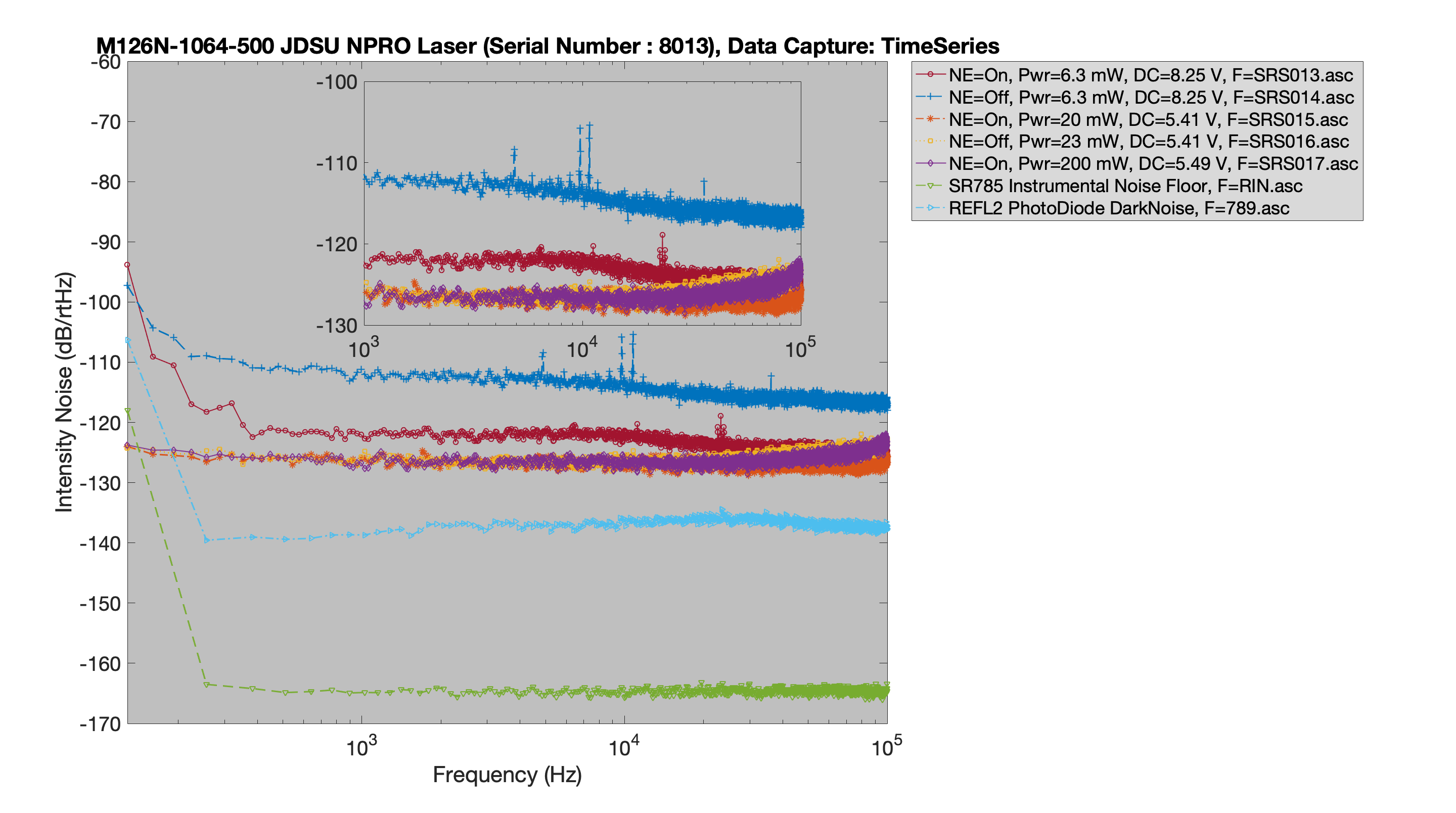
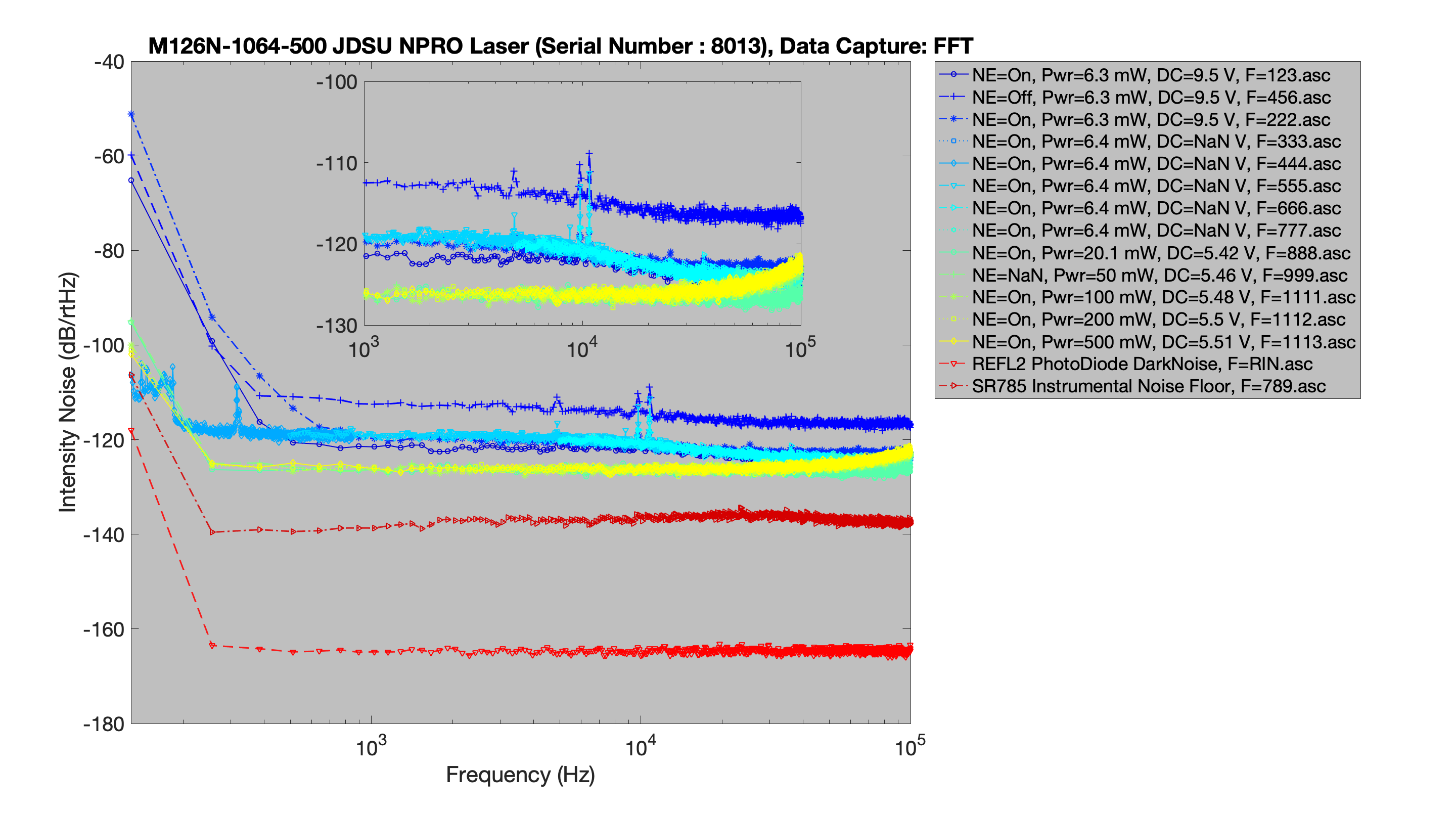
We checked the intensity noise for the testbedAI laser using SR785 at different power levels. We operated the laser at ~550 mW and dumped most of the light. Tried two methods for the analysis. One uses the in-built SR785 FFT function, and then TimeSeries capture from the buffer. Both results agree (see attached plots). Noise eater is definitely helping. It seems the measurement is noisier (broadband sense) at low incident power (< 10 mW on PD). At higher intensities (above 200 mW), we see some extra noise above 10 kHz. The best noise characteristics were seen at 20 mW. We didn't use a lens to focus the beam onto the REFL2 photodiode. Needs to check if the PD got overfilled and led to extra mechanical vibration coupling. It could also be that there is some gain peaking from the noise eater at higher power.
---------------------------------------------------------
SR785 Settings & Instructions for FFT Measurement
--------------------------------------------------------
FREQ SETTINGS
| Span: | LineWidth | Acquisition Time: | Full Span | FFT Lines: | Base Freq |
|---|---|---|---|---|---|
| 102.4 kHz | 128 Hz | 7.81 ms | 800 | 102.4 kHz |
DISPLAY SETUP
| MeasureGroup | FFT Measurement | View | Units | dB units | Peak Units | PSD Units | dBm Reference Impedance |
|---|---|---|---|---|---|---|---|
| FFT | FFT1 | LogMag | Vrms/rHz | Off | rms | On | 50 Ohm |
DISPLAY OPTIONS: [X-axis Log] [RPM frequency: Off]
INPUT
| Input Source | Analyzer Config: | Input Config | Ch1 Input Mode | Ch1 Grounding | Ch1 Coupling | Ch1 AA Filter |
|---|---|---|---|---|---|---|
| Analog | Independant Channel | A | Ground | AC | On |
:
AVERAGE: [Averaging type: Linear Avg] [Number Average: 100] [Display Average: RMS]
WINDOW: Hanning
Always click AutoRange Ch1 a couple of times when a new connection is made
Also click Start/Reset button a couple of times to refresh/update & redo the measurement
ToSave:
DISK:
Give a filename: a number (like 111) is sufficient. The filetype (.78D) is auto-added
Add Floppy and Click Display To Disk to save the file.
It is a good practice to Export Settings to Disk. It would be saved with the same filename but with .78S extension. This can be recalled later from disk for a similar experiment. Another thing is to first check the SR785 instrument noise floor measurement. It should be around 5-6 nVrms/rtHz