# Instructions for setting up a CDS user model on NW22 CyMAC [RCG/RTS version 5.1.4]
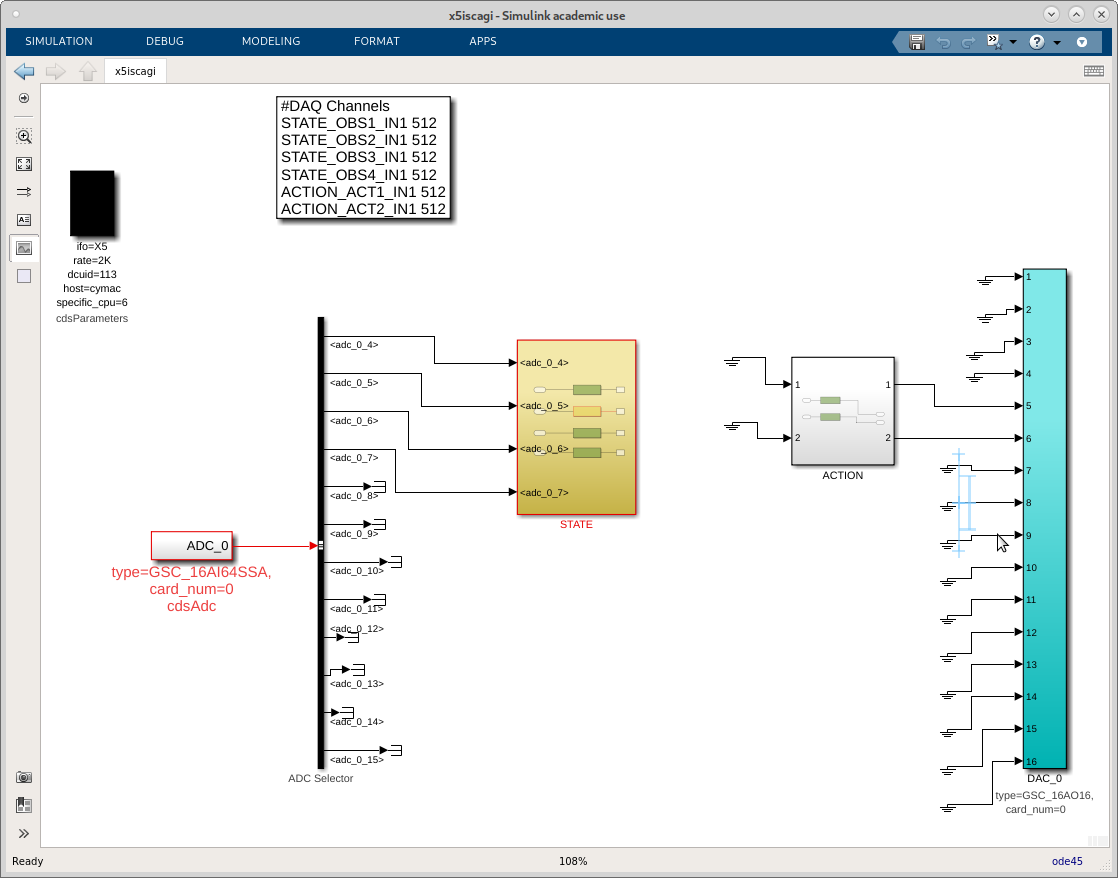
Steps used to create the x5iscagi model used for the testbedAI experiment. The same procedure can be followed for any new user model.
# Make sure the right version of OS is running. Else, restart the CyMAC & Select Debian GNU/Linux as OS from the GRUB [the first option]. The ADC/DAC chassis must be turned on before the restart.
#Open MATLAB R2020b
# Go to CDS Simulink Model Folder
cd /opt/rtcds/userapps/cds_user_apps/trunk/sqz/m1/x5-cymac/models
# Create a model (duplicate an existing model like x5iscqpd)
# Model name must start with the IFO name (x5) followed by three letter subsystem name (ex: isc), then the rest as per the user. File extension: .mdl. For example: x5iscagi.mdl
# Make sure to edit the cdsParameters file and add a new unique integer for dcuid & specific_cpu. Also set the model rate. In case, you don't high sampling rates, it is better to reduce the model rate. For example:
ifo=X5
rate=2K
dcuid=113
host=cymac
specific_cpu=6
# add the channels that you want to save to frame files should be specified within the # DQ Channels block. In case, you don't need the channel to be sampled at a high rate, it is recommended to reduce the DQ channel sampling rate. It can be different for different channels. For example:
#DAQ Channels
STATE_OBS1_IN1 512
STATE_OBS2_IN1 512
STATE_OBS3_IN1 512
STATE_OBS4_IN1 512
ACTION_ACT1_IN1 512
ACTION_ACT2_IN1 512
# here STATE & ACTIO are top level blocks. OBS1, ACT1 etc are cdsFilter blocks. IN1 specifies the filter block input. 512 is the sampling rate for the specific channel.
# GoTo GDS PARAM Folder & add the new model to testpoint.par file
# Make sure Each Model has only 1 DCUID assigned
cd /opt/rtcds/tst/x5/target/gds/param/
# For example:
[X-node-113]
hostname=cymac
system=x5iscagi
#Usage: INFO about /usr/bin/local_dc [options]
The local_dc process concentrates or combines the shared memory buffers from LIGO FE models into one buffer formated for injestion into the daqd or transmission over the network.The local_dc needs to get some information from the model .par files.
# then build & install models
rtcds build x5iscqpd
rtcds install x5iscqpd
# Sometimes removing older versions of the model from the Cache location helps in the build & install process
/var/cache/advligorts/rcg-5.1.4/models/
# then sudo edit the master file in /etc/advligorts/master and add the path to the generated parameter files MODELNAME.ini and tpchn_MODELNAME.par. These files are auto-generated from the rtcds-build command and the files located in the respective target MODEL build folder, for example
sudo vim /etc/advligorts/master
# add the filepaths to the file, ex:
/opt/rtcds/tst/x5/target/x5iscagi/param/X5ISCAGI.ini
/opt/rtcds/tst/x5/target/x5iscagi/param/tpchn_x5iscagi.par
# try to stop all the user models, then stop the frontend IOP model. If you forgot to stop a user model before stopping the frontend IOP model, sometimes the code will be unresponsive to the rtcds stop command. One way to fix is to reboot the machine ($ sudo reboot). There could be other/better ways.
# After stopping all the models, one should build & install the user models, then build & install the frontend iop model. Then start the front end model and then the usermodels. User model rebuilt is only necesasry of you modifed the simulink model.
# For example one can check/run the updated ~/rebuild_install_start_models.sh.
# stop user models
rtcds stop x5iscagi &&
rtcds stop x5iscqpd &&
# stop frontend IOP model
rtcds stop x5iopmhz &&
# build & install frontend IOP model
rtcds build x5iopmhz &&
rtcds install x5iopmhz &&
# build and install user models
rtcds build x5iscqpd &&
rtcds install x5iscqpd &&
rtcds build x5iscagi &&
rtcds install x5iscagi &&
# start the frontend model
rtcds start x5iopmhz &&
# start th user models
rtcds start x5iscqpd
rtcds start x5iscagi
# Check User-model GDS-TP MEDM screens for any red lights
cd /opt/rtcds/tst/x5/medm/x5iscagi
medm -x X5ISCAGI_GDS_TP.adl &
# if you see DAQ & FE as red, then it is resolved by restarting the data concentrator. If you see DK as red, it *could be* related to some of the modesl that use DAC not currently active/started. This should not be a major issue atleast for the above topic. Or you could start those models or modify them.
# Now you should add the new model name to the local_ data concentrator argument in the /etc/advligorts/systemd_env file. This file is readonly, hence use sudo vim.
# For example:
sudo vim etc/advligorts/systemd_env
# modify
local_dc_args="-d /opt/rtcds/tst/x5/target/gds/param/ -m 100 -b local_dc -s 'x5iopmhz x5iscqpd x5iscagi' -w 0"
# Restart Advanced LIGO RTS local data concentrator
sudo systemctl restart rts-local_dc
# check status
sudo systemctl status rts-local_dc
# Restart Advanced LIGO RTS data acquisition daemon
sudo systemctl restart rts-daqd
# check status
sudo systemctl status rts-daqd
# Restart Advanced LIGO RTS Network Data Service
sudo systemctl restart rts-nds
# check status
sudo systemctl status rts-nds
# Check front end GDS IOP status [check for red flags]
cd /opt/rtcds/tst/x5/medm/x5iopmhz
medm -x X5IOPMHZ_GDS_TP.adl &
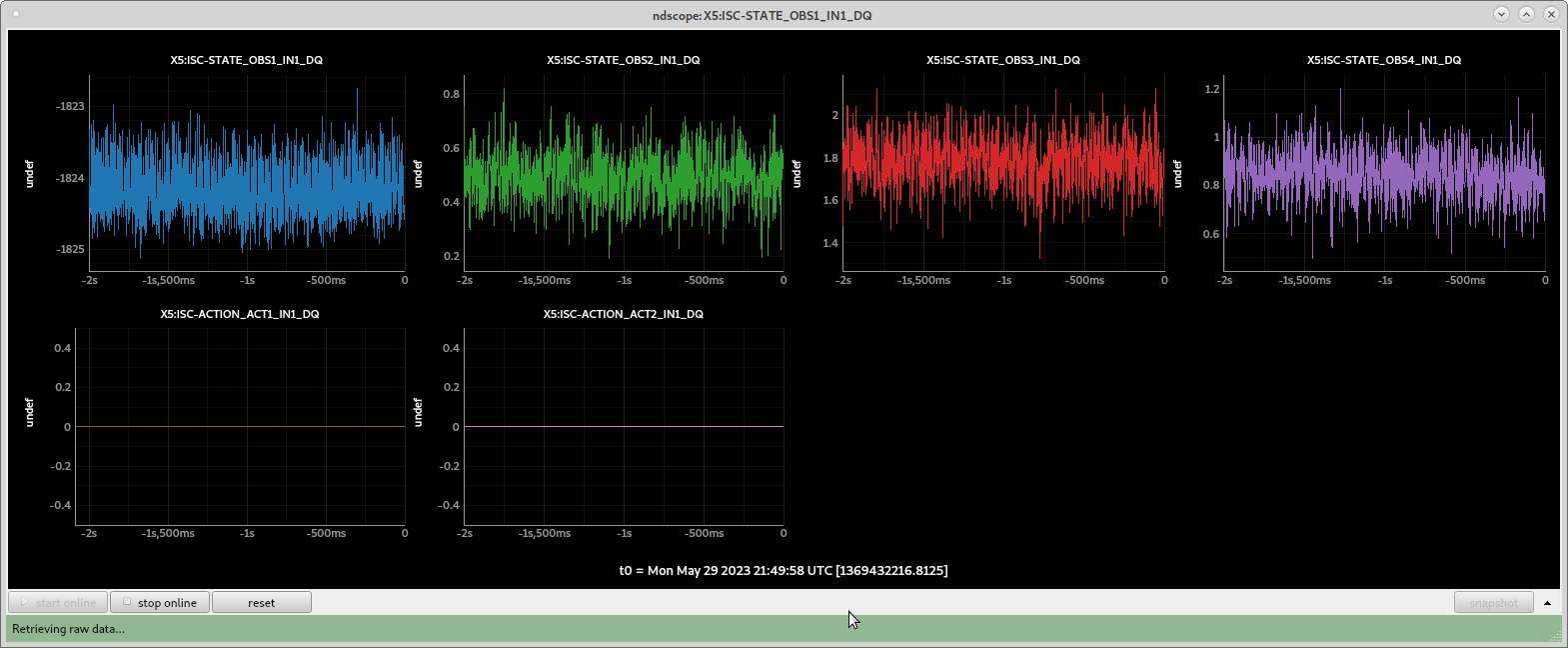
# open NDSCOPE & fetch/plot data
ndscope &
# the model dcuid must be listed under Tree->X5->FEC
# select and plot the required channels. It can also be done from command line or from a saved yaml file. Ex, from commandline
ndscope X5:ISC-STATE_OBS1_IN1_DQ &
# sometimes when I direclty close the ndscope, it crashes the frontend model. Not sure why (?), to fix it, stop & restart the front end & the user models (no need to rebuild). Check ~/restart_models.sh. I think, if you first click stop online and then close the scope then things should be alright.